| Lesson 5
|

 Make sure you go through the new Arabic Language Frequently Asked Questions section (FAQs). It has a growing list of common questions selected from hundreds of visitors and students of Arabic language.
Now, you should be wondering about the letter "Hamza" that was the last letter in the table back in lesson 1, well.. this lesson is all about it:
The "Hamza" is one of the three kinds of vowels in Arabic (vowel marks were explained in the previous lesson). It may be the most complicated subject in Arabic scripting, I think that it needs a tutorial on its own (even some Arab natives can't get it right in dictation in some cases). Anyway I'll try to make it as easy as possible giving only the basics, so here we go:
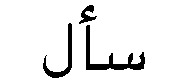
First, the "Hamza" is the pronunciation of "U"  as in "UGH" (that was the first appropriate word that came to my mind) where ever it is used in a word, this means that the word should be cut at the "Hamza" and an "U" should be pronounced whenever it appears. Let's have an example on this:
 |
Audio |
The example | Pronunciation |
|---|---|---|
|
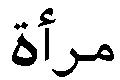 |
Mar-aa |
|
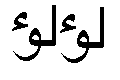 |
lu-u-lu-u |
|
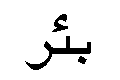 |
Bi-er |
|
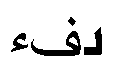 |
Dif-e |
 Notes:
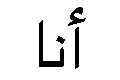 |
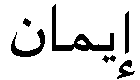 |
By now you should have learned all the basics of Arabic language script and some words and sentences, and you should be able to read or write some Arabic words. Now, what is left for you to do is learn Arabic vocabulary and some grammar to be able to create sentences. These tasks need more than a simple on-line tutorial, they need some time and work from you! For vocabulary, I highly recommend getting an Arabic electronic dictionary.
If you have any questions on something included in this tutorial (or not !!) just send me a message and I'll be happy to answer them as soon as possible. If you have any thoughts, questions or ideas just tell me about them.
1- Try writing your name using the the Arabic alphabets forms in the table in lesson 2. Just copy and paste the letters in any image editor and you will have Arabic words as GIF files ,unless you have Arabic fonts installed in your system).
 |
Now , your system should accept Arabic fonts in most applications (Word Pad, MS Word, Outlook Express and many more. Just select the Arabic text then select the Arabic font to apply, and there you have it, Arabic text on a non-Arabic system). Now you would need an Arabic Keyboard to be able to type Arabic on your PC or laptop. I recommend you buy either an Arabic keyboard for your PC/laptop |
I also highly recommend you check these blogs and websites if you're interested in studying Arabic abroad (which is usually the best way to learn):
|
If you liked this tutorial, and you have the time and capabilities of translating it into your own language, then please contact me now. It is already available in English, Spanish, Deutsch, French, Portuguese, Italian, Indonesian and Greek. I look forward to seeing it in other languages.
|
|
Note: Use this Arabic language dictionary as a learning aid:
|
| Search Arabic Language Resources: |
|
|||||||
|
. HOW TO MAKE THE MOST OUT OF THIS ARABIC LANGUAGE COURSE? Do you hate huge paper dictionaries as much as I hate them? While learning Arabic or if you are traveling to an Arab country, I highly recommend getting an Arabic language electronic dictionary. I spent some time browsing the Internet looking for a good one. I ended up choosing the Language Teacher by ECTACO.
I was really startled by the value! They make dictionaries in more than 20 languages (including Arabic) and in various price categories. I recommend these dictionaries to anyone who intend traveling to Arab countries or wants to learn Arabic on the move. They also make great gifts!
You can familiarize yourself with such dictionaries here. Make your time learning Arabic easier - you have no idea how much help you can get from a tiny handheld device. I guarantee you'll be as amazed as I was.
|
| If you liked this tutorial and thought that it helped you, then feel free to add a link to this tutorial from your website and share it with other people.
|



 or
or  By public demand, I added some


